Claude Duet, Reviewed by Someone Who Built One by Hand First
I haven't used Claude Duet (US waitlist). I've run a hand-built one for a year: 17 bots, approval cards, one DM. What Anthropic got right, and my one question.
Let me get the disclaimer out of the way: I have not used Claude Duet. It launched yesterday (21 October 2026) as a research preview, on a waitlist, for US subscribers only, and I am in Korea running a food-distribution company’s back office. So this is not a hands-on review.
What I do have is a year of running the thing Duet describes, except I built mine out of Claude Code, a Slack bot, a Google Sheet and a laptop that isn’t allowed to sleep. Seventeen bots, one MacBook, US$100 a month. So when I read Anthropic’s launch page, it read less like a product announcement and more like someone had been going through my logs. Here is what they got right, with the evidence from our side, and the one thing I’d want to know before letting it near the company.
What Duet is, in five lines
According to Anthropic’s product page and Engadget’s launch coverage:
- A standalone app (iOS, Android, web) where Claude runs on its own cloud computer, connected to your Gmail, Calendar, Slack, Drive, Stripe and so on.
- It sends a morning brief, “then stays quiet until something needs you.”
- It keeps working while you’re away: meetings, dashboards, invoice reminders, drafts for approval.
- It “asks you before sensitive operations like sending messages or paying.”
- Runs on Opus 5.5, shares your plan’s usage limits, checks your accounts “every few hours” rather than constantly, to save those limits.
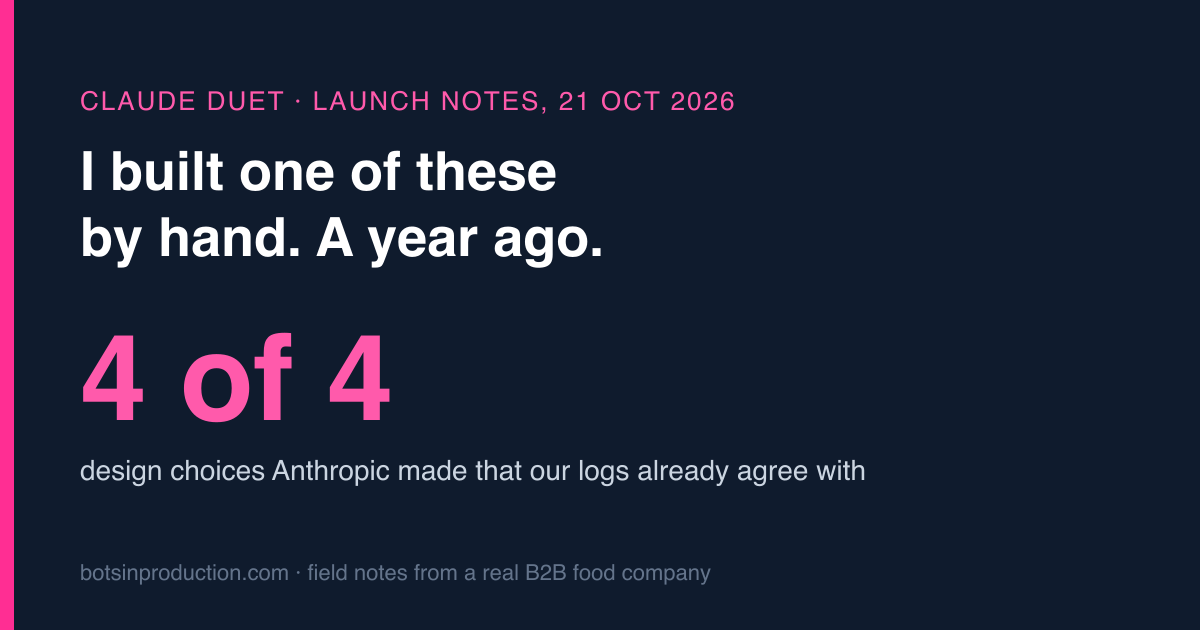
The press frames it as Anthropic’s answer to Meta Muse and OpenAI’s dots. Fine. I’m more interested in the four design choices underneath, because we made each of them the hard way.
Choice 1: ask before it acts. Yes. This is the whole product.
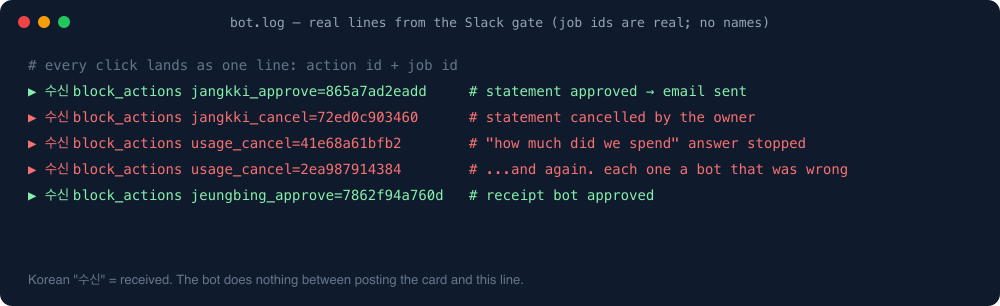
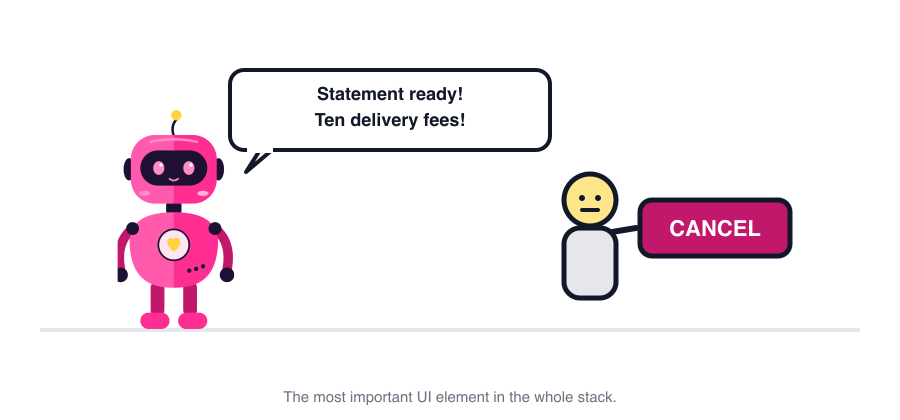
Every one of our bots, before it sends a statement, emails a customer or writes a claim row, posts a Slack card with two buttons: Approve and Cancel. Nothing goes out without a human click. Duet’s “asks before sending or paying” is the same gate.
Here is what a year of that gate taught us, which I hope Duet’s team already knows:
- The Cancel button is the product. Our bots are right most of the time. The Cancel clicks are what make the rest survivable. Two of those clicks caught real bugs I can point to in the log: a delivery fee repeated per line instead of once per order, and a “how much did we spend” answer that counted one store when the customer meant every store of the brand. Nobody would have noticed until the customer did.
- The gate has to be where the human already is. Ours lives in Slack because that’s where everyone already spends the day, and a red badge on a DM gets clicked within minutes. Duet living in a dedicated app is the one thing here that worries me. A new app is a new place to forget to look.
- “Sensitive” needs a list, not a vibe. Our rule is mechanical: anything that leaves the company (email, message, money, deletion) is gated; anything internal (a sheet row, a log line) is not. Duet’s wording is “sending messages or paying”, which sounds like the same list. Good.
Choice 2: check every few hours, not constantly. Also yes, and it’s about money.
Engadget quotes Anthropic: Duet “checks your connected accounts every few hours, because checking nonstop would use up your plan’s limits much faster.” That is the most honest sentence in the launch, and it is the exact trade-off we live with.
Our support-chat bot polls the chat tool every few minutes because customers expect a reply inside the hour. Our claims batch runs once, at 03:00, because nobody needs it sooner. Our monthly statements run once a month. The cadence is set by the question “how late can this be before someone is hurt?”, and every notch towards “real time” costs subscription usage. We run all seventeen bots on one Max 5x plan (US$100) precisely because they don’t talk much; a bot that polled every minute would eat the plan by lunchtime.
So “every few hours” is the right default for an inbox and a calendar. It is the wrong default for anything customer-facing, and the launch page doesn’t say whether you can change it. If you’re planning to point Duet at a support queue, that’s the first setting to look for.
Choice 3: one morning brief, then silence. Yes, with a scar.
Duet promises a morning brief and then quiet “until something needs you”. We arrived at the same shape by failing at the alternative.
We built a #bot-alerts channel first. Everyone joined. Everyone, including me, had muted it within a week. An unread count of 300 in a channel means nothing. So we moved every bot error to one DM, mine, and made the rule that a bot may interrupt a human for exactly two reasons: it needs a click, or it broke. Everything else goes into a daily note at 18:00.
That is Duet’s “brief, then quiet” with the numbers filed off. The test I’d apply to Duet is the one I apply to our bots: if it pings me ten times a day I’ll mute it in a week; if it pings me twice and is right both times I’ll never turn it off. Anthropic says it is “continuing to test its judgment about when to message you.” That’s the right thing to be testing.
Choice 4: “it may miscalibrate what’s urgent”. The honest line, and my one question.
The launch page says Duet “may misread a thread or miscalibrate what’s urgent, and it can miss something that arrives between checking in with you.” Every bot we run was wrong in exactly those ways at first. The reason they’re less wrong now is not a better model. It’s a corrections log.
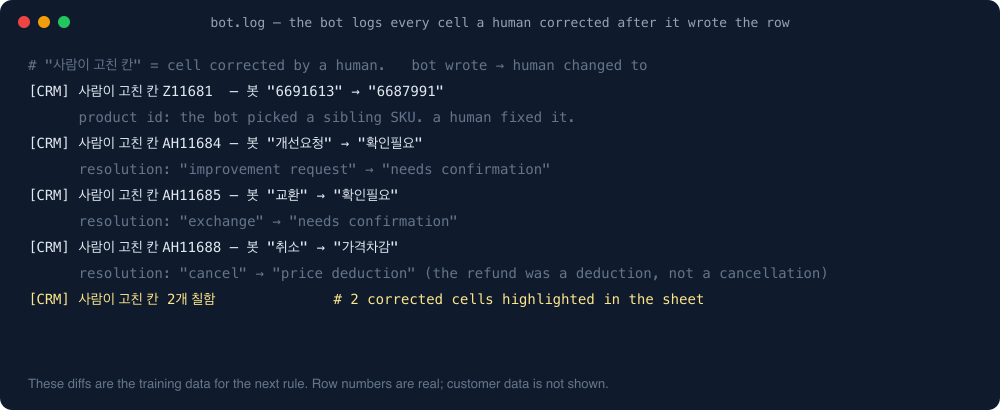
When a human fixes something a bot did, the bot logs the before and after. Each night a scheduled task reads those diffs and writes a plain-language note: “bot said X, human changed it to Y, here is the rule we think that implies.” Over a year that produced more than forty rules the bots now follow, from “a replacement shipment is a new row, not an edit” to “if the customer says ‘N stores’ they mean every store of that brand.” None of those came from a model update. All of them came from a human clicking Cancel or fixing a cell, and something turning that into a rule.
So my one question for Duet is: when I correct it, does the correction stick, and can I see the rule it learned? The page says Duet shares memory with the Claude app, which might mean yes. If it does, Duet will get better in my hands the way our bots did. If every correction evaporates into “I’ll keep that in mind”, it will be a very polite intern who makes the same mistake every Tuesday.
Should you wait for Duet or build your own?
Honest answer, from someone who built his own and would rather not have:
| Your situation | What I’d do |
|---|---|
| Your work lives in Gmail, Calendar, Slack and Drive, you’re in the US, you’re on Pro or Max | Join the waitlist. Stop building. This is what Duet is for. |
| You need it on a Team or Enterprise plan | Wait. The page says not yet. |
| Your work lives in a tool Duet has no connector for (a Korean chat-support app, a WMS, a legacy admin panel) | You still build. Nothing in the launch changes that. |
| You need customer-facing latency (minutes, not hours) | Build, or at least read the settings very carefully before trusting “every few hours”. |
| You already run Claude Code bots on the same Max plan | Budget for it. Duet’s background checks come out of the same usage limits your bots use. Ours would notice. |
For us it’s the third and fifth rows, so the seventeen bots stay. But if Duet had existed a year ago, I’d have started there and built only the parts it couldn’t reach, which would have saved me most of the first two months.
One line from me
None of this is hard. It’s the tedious, soul-sucking grunt work nobody wants to do. Hand every bit of it to the bot. Duet is Anthropic agreeing with that sentence in app form; the only thing I’d add is: and keep the Cancel button where you’ll actually see it.